On this page
All deposit methods on in999
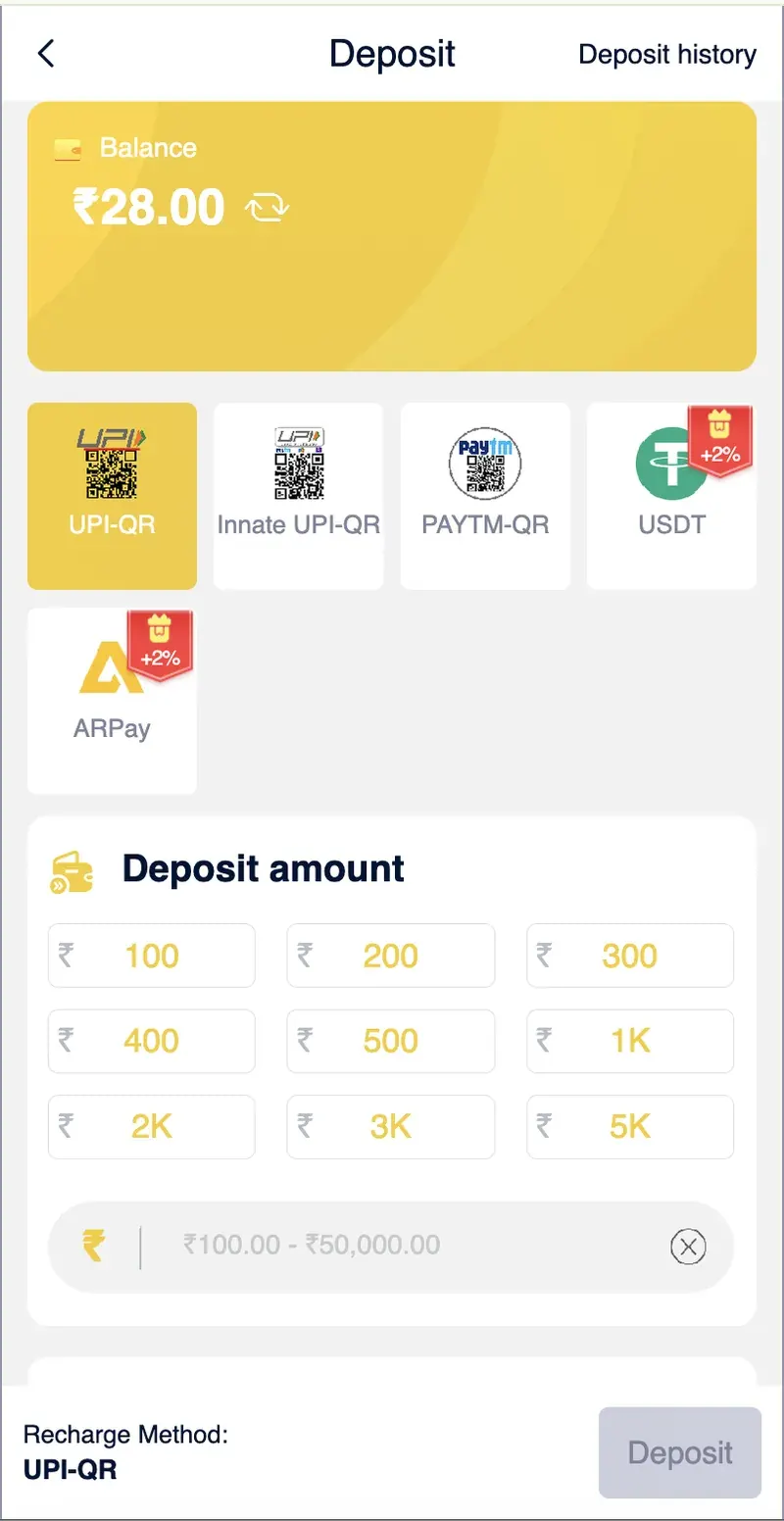
in999 supports five deposit channels. Each has a different minimum amount, processing speed, and bonus structure.
UPI-QR
Scan a QR code with any UPI app (PhonePe, GPay, Paytm, BHIM). The standard method for most Indian users.
Min: ₹100Innate UPI-QR
Alternative UPI gateway used when the primary UPI-QR is unavailable. Same minimum and processing time.
Min: ₹100Paytm-QR
Paytm wallet scan. Works for users who prefer Paytm over other UPI apps or have Paytm wallet balance.
Min: ₹100USDT (TRC-20)
Cryptocurrency deposit via the TRC-20 network. Requires a crypto wallet with USDT balance.
Min: 1 USDTARPay
Third-party payment platform using ARB digital currency. Gives a 2% bonus on every deposit.
Min: ₹100UPI-QR deposit
UPI-QR is the most commonly used deposit method. The in999 app displays a dynamic QR code that updates with each transaction. Scan the QR with any UPI app on the same phone or another device.
Steps
- Open the Deposit page from the Account tab or the Get ₹500 button.
- Tap the UPI-QR tile (highlighted in yellow by default).
- Enter the deposit amount or pick a quick-select value (₹100, ₹200, ₹300, ₹400, ₹500, ₹1K, ₹2K, ₹3K, ₹5K).
- Tap Deposit at the bottom.
- Scan the QR code with your UPI app and confirm the payment.
- Return to the in999 app. The balance updates within 1–5 minutes.
Paytm-QR deposit
Paytm-QR works the same way as UPI-QR but routes through the Paytm wallet. It is useful for users who maintain a Paytm wallet balance or who prefer Paytm's app interface.
The minimum is ₹100, and processing time is the same as UPI-QR (1–5 minutes). To use it, select the PAYTM-QR tile on the Deposit page and follow the same steps as UPI.
USDT deposit
USDT deposits use the TRC-20 network. This method is popular with users who prefer cryptocurrency and want to avoid UPI limits.
Steps
- Open the Deposit page and tap the USDT tile.
- The app displays a unique TRC-20 wallet address.
- Copy the address and paste it into your crypto wallet (Trust Wallet, Binance, or any TRC-20 compatible wallet).
- Send at least 1 USDT. Deposits less than 1 USDT will not be credited.
- Wait for 3 blockchain confirmations — usually 5–15 minutes.
- The INR equivalent appears in your in999 balance.
ARPay deposit
ARPay is a third-party payment platform that gives a 2% bonus on every deposit. It uses ARB digital currency through the AR Wallet. The AR Wallet must be activated before use.
Steps to activate AR Wallet
- Open the Deposit page and tap the ARPay tile.
- Tap Activate on the AR Wallet prompt.
- Follow the on-screen KYC steps (Aadhar-based verification).
- Once activated, choose a deposit amount and confirm.
- The 2% bonus is credited along with your deposit.
Deposit amount options
The Deposit page offers quick-select buttons for common amounts and a custom amount field.
| Amount | Notes |
|---|---|
| ₹100 | Minimum deposit |
| ₹200 | Quick-select |
| ₹300 | Quick-select |
| ₹400 | Quick-select |
| ₹500 | Unlocks ₹500 gift bonus |
| ₹1K – ₹5K | Higher tiers |
| Custom | Up to ₹50,000 per transaction |
The maximum deposit per transaction is ₹50,000. Larger deposits may require multiple transactions.
Step-by-step deposit process
Open the Deposit page
From the in999 home screen, tap the Get ₹500 button in the bottom navigation, or open the Account tab and tap Deposit.
Choose a deposit method
Select UPI-QR, Innate UPI-QR, Paytm-QR, USDT, or ARPay. The UPI-QR tile is highlighted by default.
Enter the deposit amount
Enter at least ₹100 for UPI methods or 1 USDT for crypto. Or use the quick-select buttons.
Complete the payment
Scan the QR code with your UPI app, or send USDT to the given address. Match the exact amount shown on the order.
Confirm the credit
Return to the app. UPI deposits credit within 1–5 minutes. USDT requires 3 blockchain confirmations (5–15 minutes).
Deposit not received — what to do
Wait 15 minutes first
Most "missing" deposits are simply delayed. UPI confirmations can take up to 15 minutes during peak hours.
Check your order history
Open the Deposit History screen. If the deposit shows as Pending, tap it to view status. If it shows as Failed, the money will be refunded to your UPI account within 24 hours.
Verify the amount match
The deposit will only credit if the transferred amount matches the order exactly. If you sent ₹500 but the order was for ₹100, the deposit may not register.
Do not cancel the order
Once you have transferred money, do not cancel the deposit order in the app. Cancelling after transfer can delay or block the credit.
Submit a support ticket
If the deposit is still missing after 30 minutes, open the Self Service Center, select Deposit Not Receive, and submit the transaction ID (UTR number) from your UPI app.
Check the operating environment
Do not deposit while using a VPN or public Wi-Fi. Some UPI apps flag payments from untrusted networks and hold them for review.
First deposit bonus tiers
The first recharge on in999 unlocks a tiered bonus. The tier depends on the amount of your first deposit.
| First Deposit Amount | Bonus Reward |
|---|---|
| ₹24,000 | + ₹1,388.00 |
| ₹1,20,000 | + ₹5,888.00 |
| ₹2,40,000 | + ₹8,888.00 |
Plus, the ₹500 gift bonus is unlocked with invite code 187587458275 after a recharge of ₹500 or more. Bonus funds require 1x coding turnover before withdrawal.
Frequently asked questions
The minimum deposit on in999 is ₹100 for UPI-based methods and 1 USDT for cryptocurrency deposits.
UPI-QR, Innate UPI-QR, Paytm-QR, and ARPay deposits credit within 1 to 5 minutes. USDT deposits require 3 blockchain confirmations, which typically take 5 to 15 minutes.
ARPay is a payment method on in999 that gives a 2% bonus on every deposit. It uses ARB digital currency through the AR Wallet.
Wait 15 minutes before contacting support. If the deposit is still missing, open the Self Service Center in the in999 app, select Deposit Not Receive, and submit the transaction ID.
Yes. in999 supports USDT deposits, which do not require UPI. USDT deposits use the TRC-20 network and are credited after 3 blockchain confirmations.
in999 offers a 5-tier first deposit bonus. A ₹24,000 first recharge pays ₹1,388, a ₹1,20,000 recharge pays ₹5,888, and a ₹2,40,000 recharge pays ₹8,888.
Summary
in999 supports five deposit methods — UPI-QR, Innate UPI-QR, Paytm-QR, USDT, and ARPay. The minimum deposit is ₹100 for UPI methods and 1 USDT for crypto. UPI deposits credit within 1–5 minutes, and USDT requires 3 blockchain confirmations. ARPay gives a 2% bonus on every deposit. The first recharge unlocks tiered first deposit bonuses up to ₹8,888.